

The open-source AI development agent that feels at home in Godot.
Inspect your project, understand editor context, propose Godot-aware changes, and run focused development workflows without giving up control of your files.


Download | Install | Why Orca | Local Models | Demo | Contribute
Orca is an MIT-licensed AI agent built directly into the Godot editor. It combines project exploration, editor awareness, Godot-specific tools, reviewed changes, and bounded runtime workflows in one native editor dock.
Use a hosted model or bring your own local model through Ollama, LM Studio, or another OpenAI-compatible server. Orca keeps the workflow visible: it shows what it is inspecting, presents changes for review, validates supported edits, and waits for approval before writing to your project.
Orca is not a general chatbot placed beside Godot. It is a Godot development tool designed around scenes, scripts, resources, project settings, editor state, and safe project changes.
Orca runs as a Godot EditorPlugin, not as a separate desktop application or browser tab. Its dock follows Godot's editor scale and workflow, understands the active scene and script, and opens relevant files, resources, project settings, and Godot Help topics in the editor where they belong.
Orca can work with Godot concepts instead of treating the project as an unstructured folder of text:
- Inspect saved scene hierarchies, serialized properties, groups, instances, and signal connections.
- Read focused GDScript functions, including the exact unsaved source currently open in the script editor.
- Inspect selected project settings, Input Map actions, resource dependencies, diagnostics, and reflected Godot API signatures.
- Propose reviewed file edits, Input Map changes, main-scene changes, selected display settings, and constrained scene operations.
- Launch a saved scene in one bounded Orca-owned process and evaluate narrow startup or exit criteria from captured evidence.
Orca separates exploration from mutation:
- Plan mode is read-only for project and external state.
- Work mode can prepare changes and run supported workflows, but every model-requested project change still waits for an explicit Apply or Reject decision.
- When implementation is requested during a Plan turn, Orca can ask once to switch modes. It waits for an explicit Stay in Plan or Switch to Work decision and never treats that decision as approval for a file change.
- File proposals are hash-bound, validated, checked for stale or unsaved state, shown as a diff, and guarded against overwriting newer work.
- Applied proposals can be reverted while their in-memory checkpoint remains valid and the target has not changed independently.
Orca is released under the MIT License. Its source, tool contracts, safety boundaries, tests, and provider integrations are open for inspection and contribution. You can choose among supported cloud providers, connect a compatible endpoint, or use local inference without being locked into one model vendor.
- Streamed responses and tool calls with real cancellation.
- Visible, grouped tool activity with navigation back into the project.
- Persistent project-scoped conversations and multi-step task lists.
- Rich code blocks, unified diffs, expanded side-by-side review, and Apply/Reject/Revert controls.
- Context-window and session-cost visibility when provider metadata is available.
- Request-scoped project instructions and explicitly loaded project skills.
Orca 1.2.1 is a reliability-focused release for long, stateful Godot workflows:
- Strict provider completion validation, bounded total-generation deadlines, and provider/turn lifecycle ownership.
- Explicit Plan-to-Work requests without weakening normal mutation approval.
- Atomic conservative tool batches, semantic loop detection, and safe context-pressure finalization.
- Deterministic mutation recovery outcomes with retained proposal and post-write verification.
- Exact same-turn game-process cleanup, bounded final evidence, and a tested run/fix/rerun/verify workflow.
- Privacy-safe support diagnostics, resilient active composer behavior, and corrected Expanded Diff window ownership.
Read the complete release notes in the changelog or download the latest build from GitHub Releases.
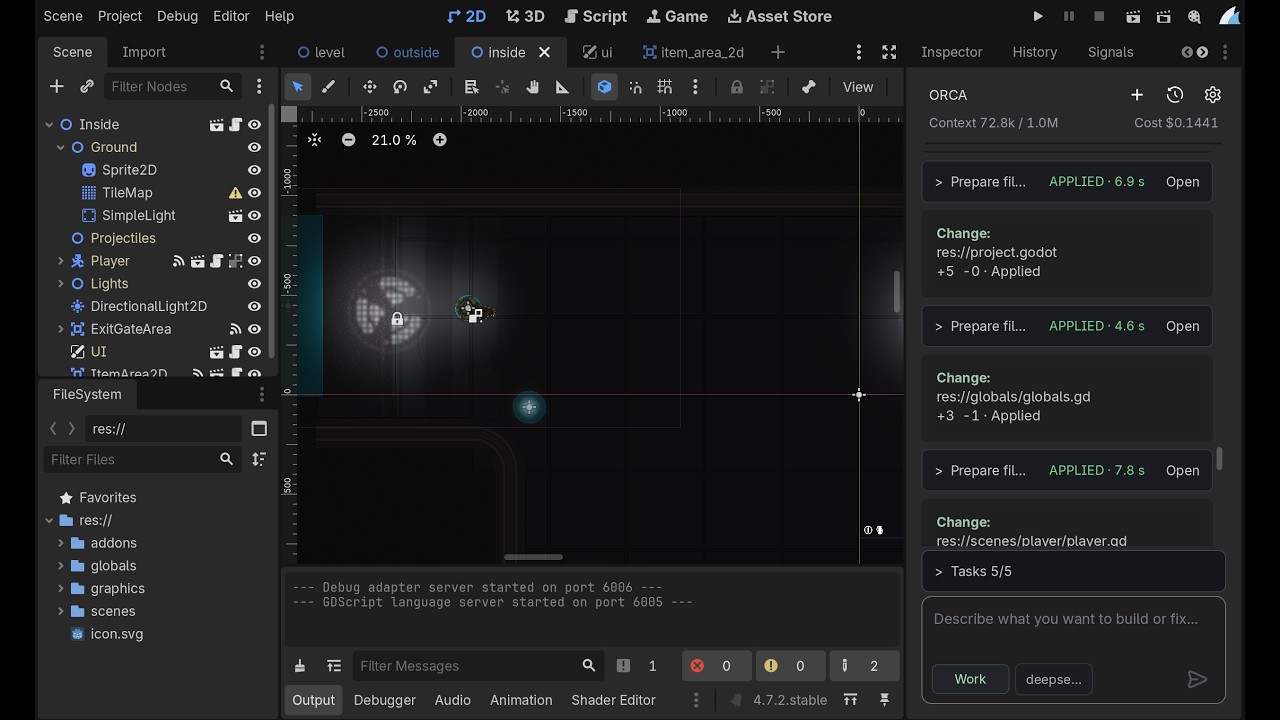
Watch Orca inspect a Godot project, propose reviewed changes, and validate the result.
Orca can connect to models served on your machine. Local inference can provide greater control over model selection and where requests are processed, while keeping the same in-editor Orca experience.
| Profile | Conventional endpoint | Model discovery | API key |
|---|---|---|---|
| Ollama | http://127.0.0.1:11434/v1 |
Native Ollama tags | Optional |
| LM Studio | http://127.0.0.1:1234/v1 |
Native LM Studio models | Optional |
| Local OpenAI-compatible | Your local /v1 base URL |
Compatible model list | Optional |
- Start Ollama, LM Studio, or another compatible local server and load a chat-capable model.
- Open Orca's settings from the editor dock.
- Select Ollama, LM Studio, or Local OpenAI-compatible.
- Confirm the endpoint, refresh the available models, or enter a Model ID manually.
- Start chatting. No API key is required when the local server does not require one.
Local and editable profiles start in Chat mode. Before Orca exposes project Agent tools, an isolated two-step function-call probe must pass for the exact provider, origin, endpoint, model, reasoning configuration, and probe version. You must then explicitly enable Agent tools for that binding.
The probe contains no project files, editor context, instructions, skills, task list, conversation history, or real Orca tool schema. A successful probe confirms one narrow protocol exchange; it does not guarantee that a model will plan well or use tools reliably on a real project.
Orca does not install models, bundle inference, or start and manage Ollama or LM Studio for you. The tested qwen2.5-coder:3b and llama-3.2-3b-instruct models worked for Chat but did not pass Orca's strict Agent probe. More capable tool-use models may be required for Agent workflows.
- OpenAI
- Google Gemini
- xAI
- DeepSeek
- OpenRouter
- Ollama
- LM Studio
- Local OpenAI-compatible servers
- Custom OpenAI-compatible endpoints
Orca currently uses a streamed Chat Completions transport. Separate credentials, endpoint, model, and reasoning-effort settings are retained per provider.
Orca is designed to assist with development work without silently taking ownership of the project.
- Orca captures bounded, request-scoped editor context.
- It inspects only the project information needed for the task through bounded tools.
- In Work mode, it prepares an immutable proposal rather than immediately changing the project.
- The proposal is validated and shown in a dedicated review card.
- You choose whether to Apply or Reject it.
- Apply rechecks the target, hashes, editor state, and validation before replacement.
Additional protections include:
- Project access remains inside
res://, rejects symbolic-link traversal, and excludes Orca's own add-on directory from agent tools. - Known unsaved scripts and scenes cannot be overwritten by proposals.
- Existing files require the exact SHA-256 returned by Orca's file reader.
- GDScript proposals are validated before review and immediately before writing.
- Tool rounds, searches, reads, responses, network inactivity, and owned game processes are bounded.
- Provider configuration is snapshotted for a turn so a tool loop cannot silently switch endpoint or model.
Orca complements source control, code review, backups, and project testing; it does not replace them.
- Download the latest Orca archive from GitHub Releases.
- Extract its
addons/orca/directory into your Godot project'saddons/directory. - Open the project in Godot 4.7.2.
- Enable Orca in Project > Project Settings > Plugins.
- Open the Orca dock, select a provider, configure a model, and start a session.
For development setup and test commands, see DEVELOPMENT.md and tests/README.md.
Before submitting a request, make sure you trust the selected provider and endpoint. Prompts, relevant editor context, and project content returned by Orca's tools may be sent to that provider. A locally hosted endpoint can still forward data elsewhere; Orca cannot verify what a server does after receiving a request.
Editable LAN and remote endpoints require confirmation for their exact scheme, host, and effective port. Orca identifies unencrypted non-loopback HTTP connections and does not follow provider chat or model-discovery redirects. Confirmation is informed consent, not proof that a server is trustworthy.
API credentials are saved through Godot Editor Settings. Project conversation history is stored locally as plaintext JSON under Godot's user:// storage. Neither mechanism is an encrypted operating-system credential vault.
The About page can copy a privacy-safe diagnostic report for support. It uses a strict allowlist containing Orca/Godot versions and coarse provider/request state; it excludes credentials, endpoint addresses, model IDs, project paths and content, conversations, model output, logs, process output, file changes, and hashes.
When present, bounded root res://AGENTS.md instructions and project-skill catalog metadata are included in private request-scoped model context. A selected skill body is sent only after an explicit read_project_skill call. This temporary guidance is removed from resumable conversation history after the turn.
See SECURITY.md for the complete security and operational model.
- Orca 1.2.1 supports Godot 4.7.2. Broader Godot compatibility is not currently claimed.
- Runtime verification uses bounded process output and predeclared startup or exit criteria. It cannot prove visual or gameplay correctness.
- Pending approvals and revert checkpoints do not survive an editor or plugin restart.
- Structured scene operations deliberately support a constrained set of nodes, values, dependencies, and signals.
- Script attach and detach require a separate Trust and Prepare decision because Godot may execute project code while constructing a candidate. This is informed consent, not sandboxing.
- Custom compatible providers may expose incomplete model or capability metadata.
- Progressive tool-schema disclosure is not currently implemented.
See DEVELOPMENT.md for the full architecture, tool contracts, safety model, test coverage, and known limitations.
The current release is Orca 1.2.1 for Godot 4.7.2. Orca is a functional development-stage agent with permanent automated tests and CI, but it is still evolving. Review proposals carefully and use version control on real projects.
Orca is built in the open, and contributions are welcome. Whether you are improving provider compatibility, refining the Godot workflow, strengthening tests, fixing a bug, or clarifying documentation, start with CONTRIBUTING.md.
For architectural context and repository rules, read AGENTS.md and DEVELOPMENT.md.
Orca is open-source software released under the MIT License. You may use, study, modify, and distribute it under the terms of that license.