Repository navigation
Detect Code References
###Outdated!
The Documentation has moved to dotnet/ResXResourceManager/Documentation

This feature helps finding orphan strings that are no longer used. If enabled it shows a new column beside the key, displaying the count of possible references to this key found in code. If you hover the mouse over the column, a tool tip shows the location and context of the detected reference. The engine does not fully parse the source code, but is using a simple text look up algorithm searching for several patterns like ResourceFile.ResourceKey or ResourceFile->ResourceKey; it may also count references in commented code, or maybe other occurrences of any of the patterns, so even if a resources count is greater than zero it may not be used. On the other hand it will not find indirect references like {"ResourceFile"ResourceKey" or even ResourceFile"Resource" + "Key"."} So be aware that a count of zero is no guarantee that this resource is not used; e.g. resources of localized WinForms controls always have a count of zero!
The patterns the algorithm is looking for are configurable on the configuration tab: 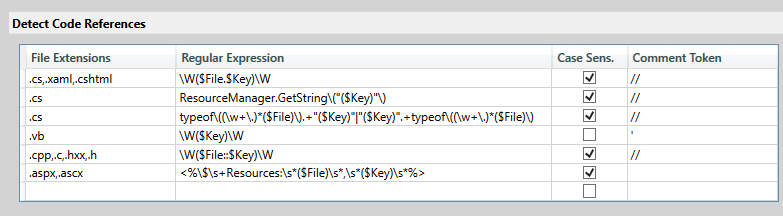
Only patterns that appear on a single line are detected. Patterns that span more than one line are not detected.