


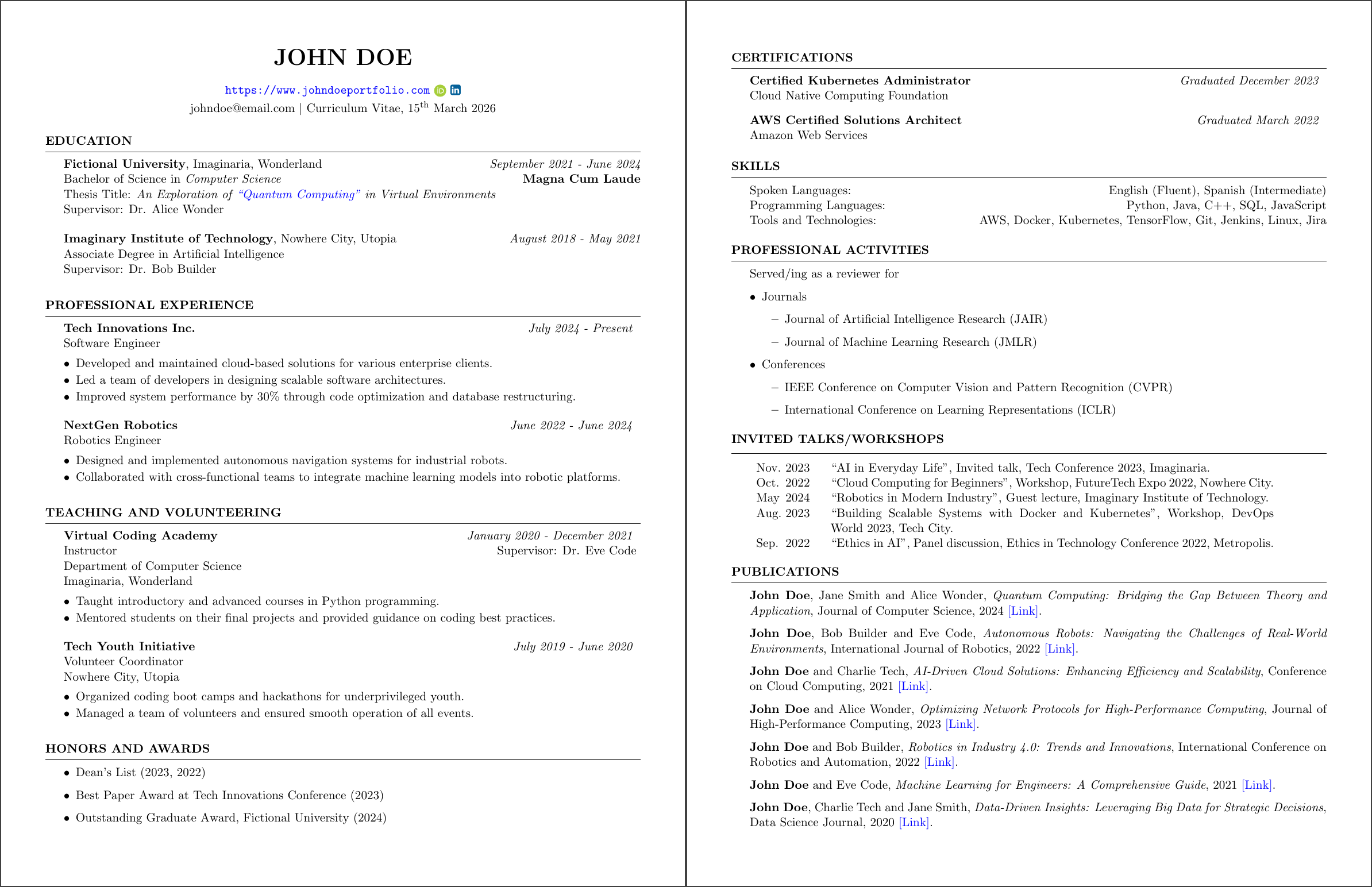
CV Tools turns a YAML file into a professional LaTeX CV. You write your details in YAML, keep your publications in a BibTeX file, and get a PDF.
| Tests | Docker image | Web app |
|---|---|---|
 |
 |
 |
- Use It in Your Browser
- Getting Started
- YAML Configuration
- Text Formatting
- Editor Support
- BibTeX Configuration
- Migrating from v1
- Contributing
Open cv-tools.phonethk.com, edit the YAML and download the PDF. Nothing to install, just an up-to-date browser.
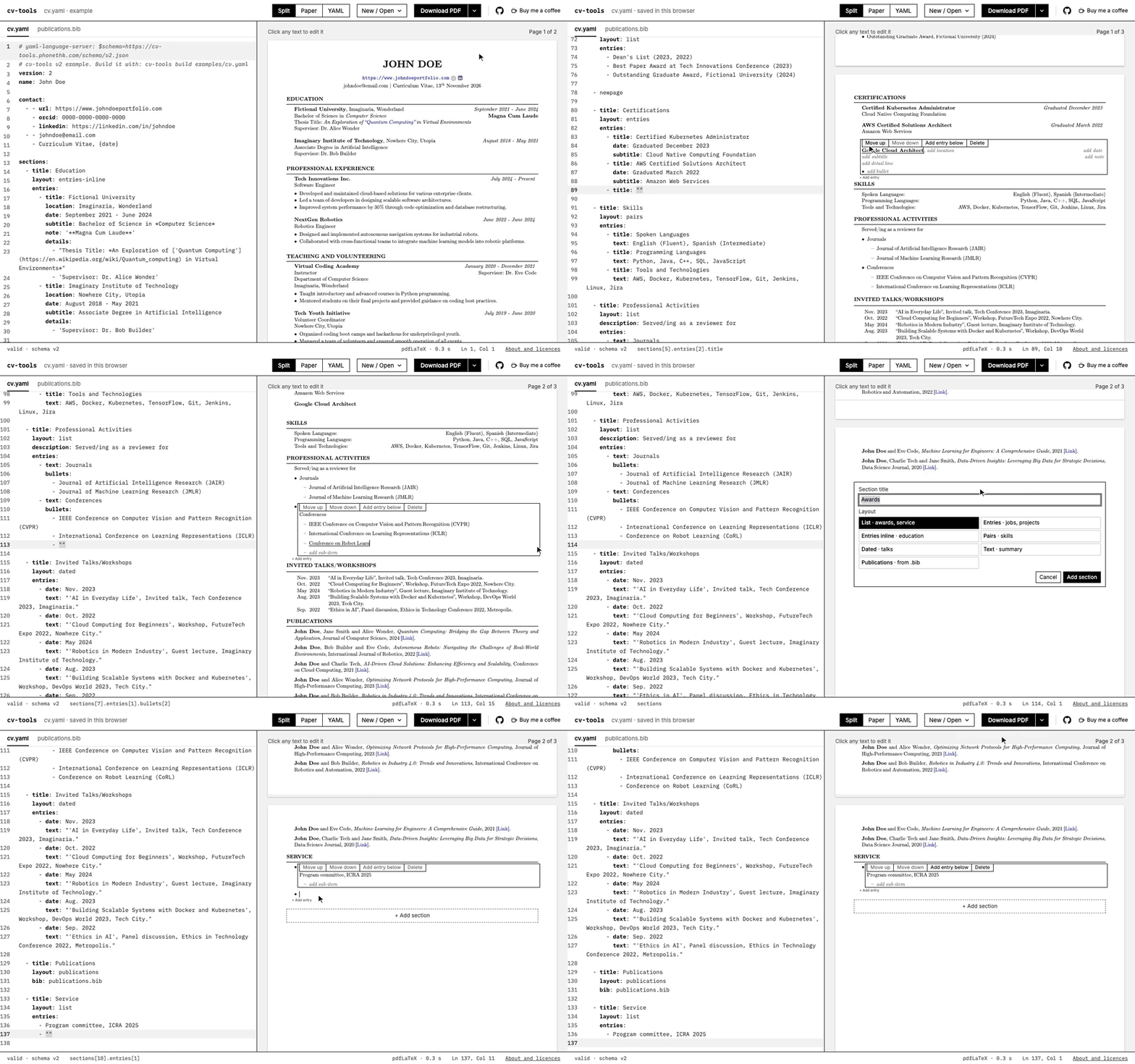
Install cv-tools with pipx. It needs Python 3.10 or newer.
$ pipx install cv-tools-clicv-tools init writes a starter cv.yaml and publications.bib. cv-tools build turns them into cv.pdf.
$ mkdir my-cv && cd my-cv
$ cv-tools init
$ cv-tools build cv.yaml
cv-tools watch cv.yaml rebuilds the PDF every time you save.
cv-tools build needs pdflatex or Docker. Without either, you can still send your CV to Overleaf.
-
TeX Live: Install TeX Live. With a small installation such as BasicTeX,
cv-tools doctor --tlmgrprints the command that installs the packages cv-tools needs. -
Docker: With Docker running, no TeX is needed.
cv-tools builduses it when pdflatex or its packages are missing, or you can ask for it.$ cv-tools build cv.yaml --engine docker
-
Overleaf:
cv-tools build cv.yaml --zipwritescv.zip. Upload it to Overleaf with New Project, then Upload Project.
| Command | Description |
|---|---|
cv-tools init |
Write a starter cv.yaml and publications.bib. |
cv-tools build cv.yaml |
Build the PDF. Add --zip or --tex-only for LaTeX sources. |
cv-tools watch cv.yaml |
Rebuild the PDF every time you save. |
cv-tools validate cv.yaml |
Check the file and report errors with line numbers. |
cv-tools migrate old.yaml |
Convert a v1 file to the new format. |
cv-tools doctor |
Check that pdflatex, the TeX packages or Docker are ready. |
A CV file has a header and a list of sections. The complete example is examples/cv.yaml.
| Key | Type | Description | Required |
|---|---|---|---|
version |
int | Always 2. |
Yes |
name |
string | Your name, printed as the page heading. | Yes |
contact |
list | Up to three lines under the name. Each line is a list of items. | No |
date |
string | The text that {date} prints. The default auto prints the compile date. |
No |
sections |
list | The sections of the CV, in order. | No |
A contact item is plain text or one of url, orcid, linkedin, github and twitter. Links print as links, and the others print as icons.
version: 2
name: John Doe

contact:
  - - url: https://www.johndoeportfolio.com
    - orcid: 0000-0000-0000-0000
    - linkedin: https://linkedin.com/in/johndoe
  - - [email protected]
    - Curriculum Vitae, {date}
Every section has a title and a layout, and lists its rows under entries. An optional description adds a line of text under the heading. Keys mean the same thing in every layout, so nested points are always bullets and a row has a title, a text and a date.
| Layout | Use it for |
|---|---|
entries |
Positions with a role, a date and bullets |
entries-inline |
A more compact version of entries |
list |
Bullet points, optionally with nested bullets |
pairs |
A label on the left and text on the right |
dated |
One line per item with a date in front |
text |
Paragraphs of free text |
publications |
Entries of a BibTeX file |
newpage |
A page break |
The entries layout lists positions, such as jobs or teaching.
| Field | Type | Description | Required |
|---|---|---|---|
title |
string | The organisation, in bold. | Yes |
location |
string | Printed after the title. | No |
date |
string | Printed on the right of the first line. | No |
subtitle |
string | The second line, for example your position. | No |
note |
string | Printed on the right of the second line. | No |
details |
list | Extra lines, such as a department or a city. | No |
bullets |
list | Bullet points. | No |
- title: Teaching and Volunteering
  layout: entries
  entries:
    - title: Virtual Coding Academy
      date: January 2020 - December 2021
      subtitle: Instructor
      note: 'Supervisor: Dr. Eve Code'
      details:
        - Department of Computer Science
        - Imaginaria, Wonderland
      bullets:
        - Taught introductory and advanced courses in Python programming.
        - Mentored students on their final projects and provided guidance on coding best practices.
    - title: Tech Youth Initiative
      date: July 2019 - June 2020
      subtitle: Volunteer Coordinator
      details:
        - Nowhere City, Utopia
      bullets:
        - Organized coding boot camps and hackathons for underprivileged youth.
        - Managed a team of volunteers and ensured smooth operation of all events.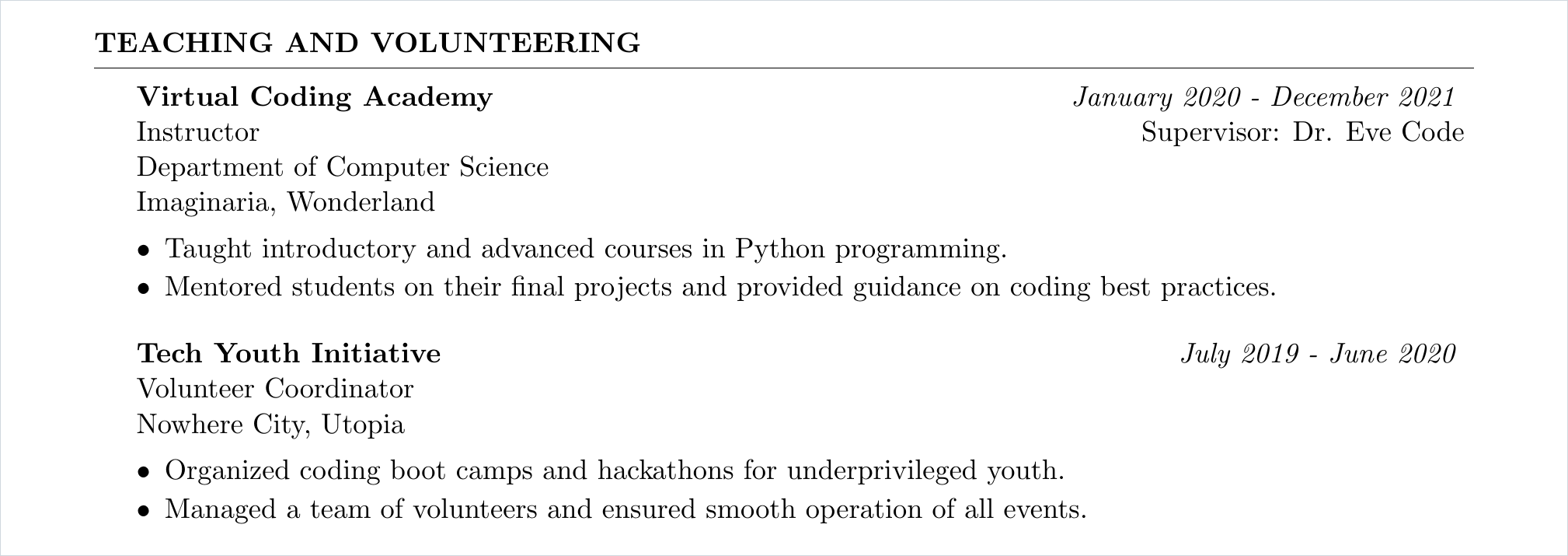
The entries-inline layout takes the same fields as entries and prints them more compactly. It suits education.
- title: Education
  layout: entries-inline
  entries:
    - title: Fictional University
      location: Imaginaria, Wonderland
      date: September 2021 - June 2024
      subtitle: Bachelor of Science in *Computer Science*
      note: '**Magna Cum Laude**'
      details:
        - "Thesis Title: *An Exploration of ['Quantum Computing'](https://en.wikipedia.org/wiki/Quantum_computing) in Virtual Environments*"
        - 'Supervisor: Dr. Alice Wonder'
    - title: Imaginary Institute of Technology
      location: Nowhere City, Utopia
      date: August 2018 - May 2021
      subtitle: Associate Degree in Artificial Intelligence
      details:
        - 'Supervisor: Dr. Bob Builder'
      bullets:
        - 'Relevant Coursework: Machine Learning, Advanced Algorithms'
The list layout prints bullet points. An entry is plain text, or a text with nested bullets.
| Field | Type | Description | Required |
|---|---|---|---|
text |
string | The bullet point. | Yes |
bullets |
list | Nested points under this bullet. | No |
- title: Honors and Awards
  layout: list
  entries:
    - Dean's List (2023, 2022)
    - Best Paper Award at Tech Innovations Conference (2023)
    - Outstanding Graduate Award, Fictional University (2024)

- title: Professional Activities
  layout: list
  description: Served/ing as a reviewer for
  entries:
    - text: Journals
      bullets:
        - Journal of Artificial Intelligence Research (JAIR)
        - Journal of Machine Learning Research (JMLR)
    - text: Conferences
      bullets:
        - IEEE Conference on Computer Vision and Pattern Recognition (CVPR)
        - International Conference on Learning Representations (ICLR)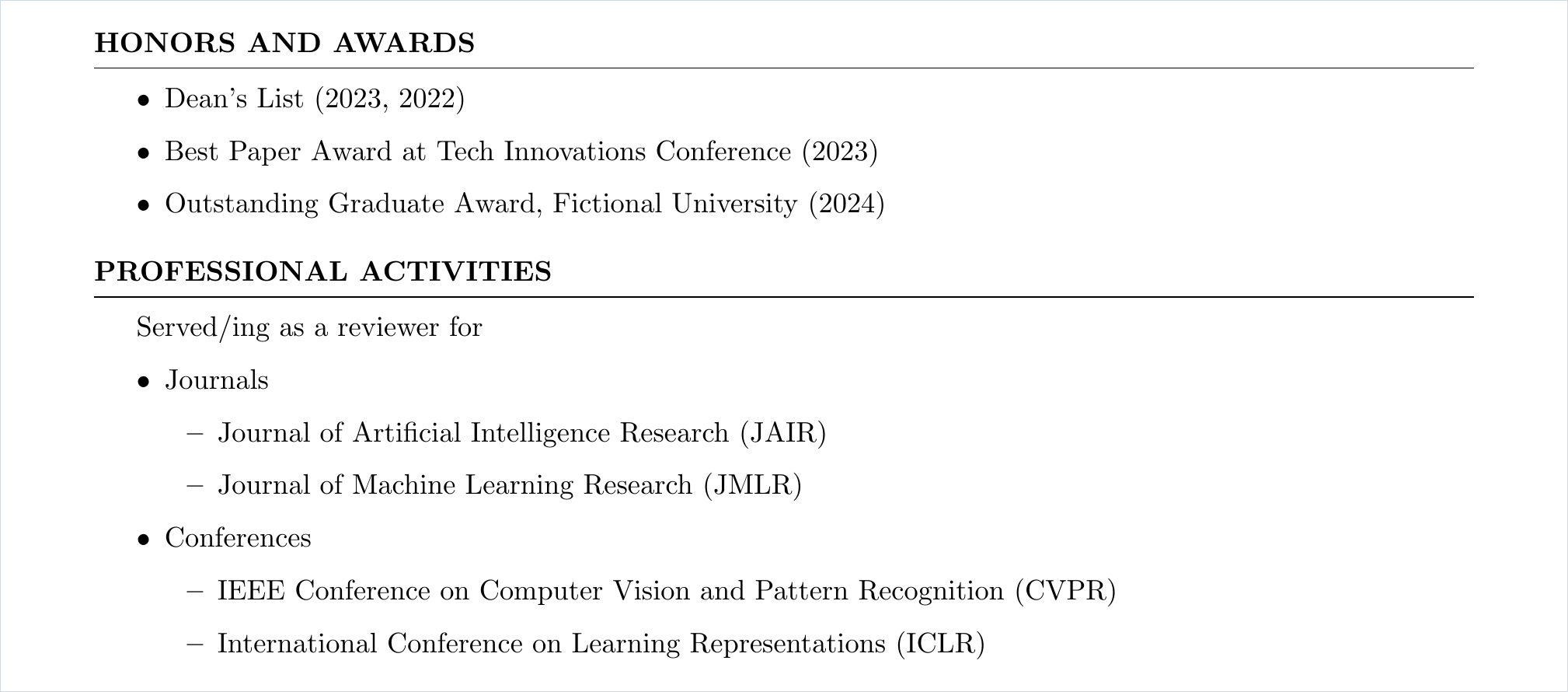
The pairs layout prints a label on the left and its text on the right, useful for skills and languages.
| Field | Type | Description | Required |
|---|---|---|---|
title |
string | The label on the left. | Yes |
text |
string | The text on the right. | Yes |
- title: Skills
  layout: pairs
  entries:
    - title: Spoken Languages
      text: English (Fluent), Spanish (Intermediate)
    - title: Programming Languages
      text: Python, Java, C++, SQL, JavaScript
    - title: Tools and Technologies
      text: AWS, Docker, Kubernetes, TensorFlow, Git, Jenkins, Linux, Jira
The dated layout prints one line per entry with the date in front.
| Field | Type | Description | Required |
|---|---|---|---|
date |
string | The date, such as Nov. 2023. |
No |
text |
string | The talk, event or item. | Yes |
- title: Invited Talks/Workshops
  layout: dated
  entries:
    - date: Nov. 2023
      text: "'AI in Everyday Life', Invited talk, Tech Conference 2023, Imaginaria."
    - date: Oct. 2022
      text: "'Cloud Computing for Beginners', Workshop, FutureTech Expo 2022, Nowhere City."
    - date: May 2024
      text: "'Robotics in Modern Industry', Guest lecture, Imaginary Institute of Technology."
    - date: Aug. 2023
      text: "'Building Scalable Systems with Docker and Kubernetes', Workshop, DevOps World 2023, Tech City."
    - date: Sep. 2022
      text: "'Ethics in AI', Panel discussion, Ethics in Technology Conference 2022, Metropolis."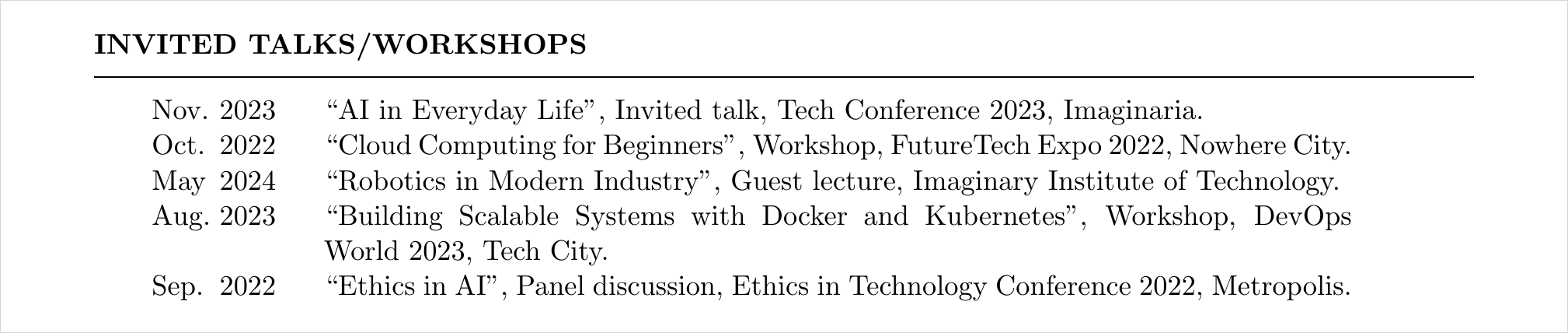
The text layout prints one paragraph per entry, for a summary or a research statement.
| Field | Type | Description | Required |
|---|---|---|---|
text |
string | The paragraph. | Yes |
- title: Summary
  layout: text
  entries:
    - Software engineer with five years of experience in *cloud platforms* and *robotics*.
    - Interested in autonomous navigation, scalable systems and teaching programming to new developers.
The publications layout lists the entries of a BibTeX file. It has no entries. See BibTeX Configuration.
| Key | Type | Description | Required |
|---|---|---|---|
bib |
string | The .bib file, relative to the YAML file. |
Yes |
highlight |
list | Author names to print in bold. The default is your name. |
No |
- title: Publications
  layout: publications
  bib: publications.bib
  highlight: [John Doe]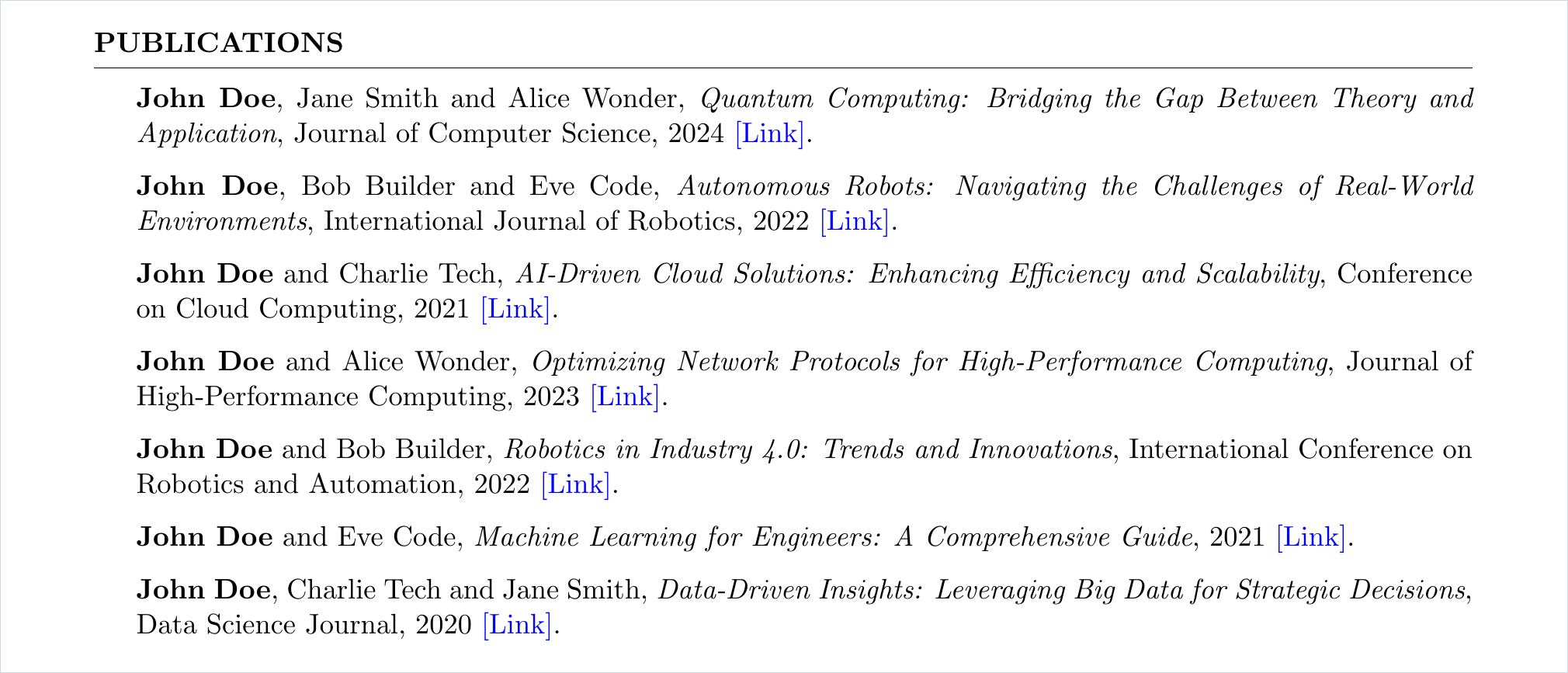
The plain string newpage in the section list starts a new page.
sections:
  - title: Honors and Awards
    layout: list
    entries:
      - Dean's List (2023, 2022)
      - Best Paper Award at Tech Innovations Conference (2023)

  - newpage

  - title: Certifications
    layout: entries
    entries:
      - title: Certified Kubernetes Administrator
        date: Graduated December 2023
        subtitle: Cloud Native Computing Foundation
Every text field understands a small Markdown-like markup.
| Write | Result |
|---|---|
**Bold** |
Bold |
*Italic* |
Italic |
[My Portfolio](https://...) |
A link |
"First line\nSecond line" |
A line break |
| two spaces | A small space |
| four spaces or a tab | A wider space |
'quoted phrase' |
“quoted phrase” with LaTeX quotes |
30% of R&D |
Printed as written, with no escaping |
5\* rating |
5* rating, with a literal star |
{latex: '\textsc{Name}'} |
Raw LaTeX, inserted as it is |
Accented letters, Greek letters and common math symbols print as they are. See the full list of supported characters.
- title: Text Formatting
  layout: list
  entries:
    - "**Bold**, *italic* and ***bold italic*** text"
    - "A [link to my portfolio](https://www.johndoeportfolio.com)"
    - "A 'quoted phrase' becomes LaTeX quotes"
    - "First line\nSecond line"
    - "Two  spaces and four    spaces"
    - "LaTeX specials print as written: 30% & $5 for #1 in C_1"
    - "Literal escapes: 5\\* rating and \\[not a link\\](x)"
    - "Unicode: café, naïve, α ≤ β, x → ∞"
    - {latex: "Raw \\LaTeX: \\textsc{Small Caps}"}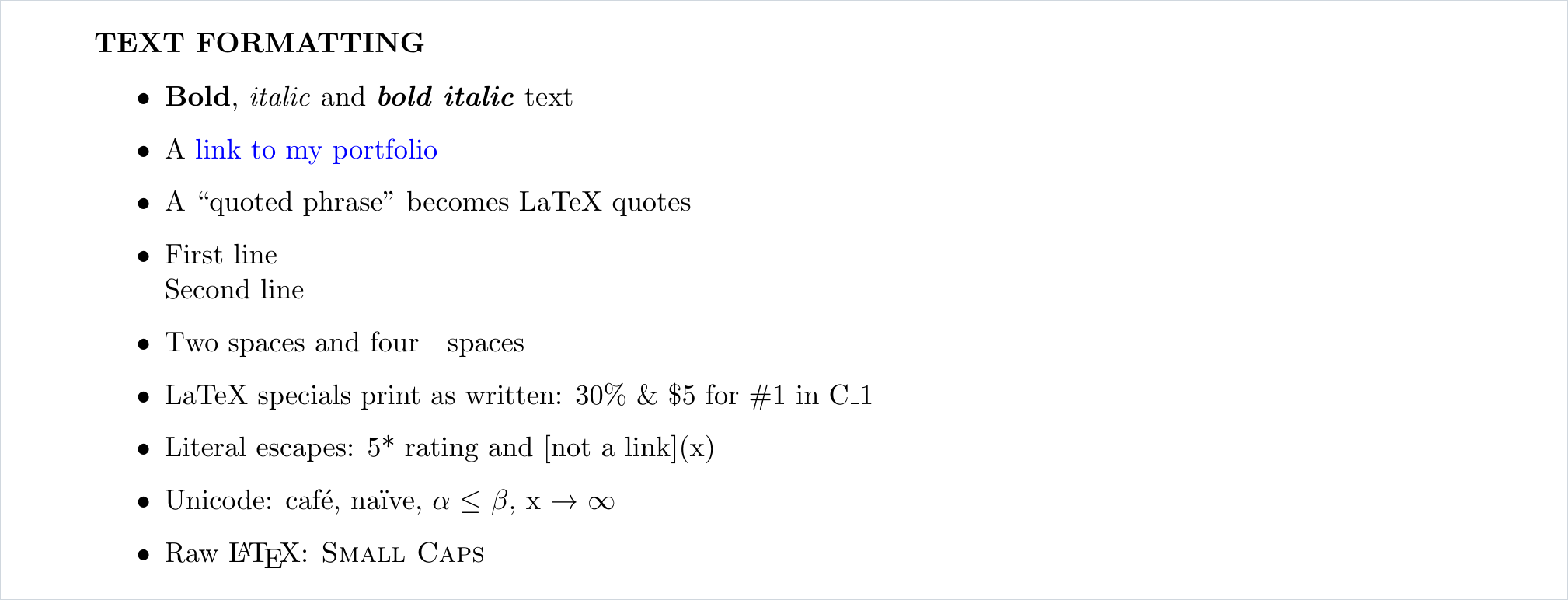
Files from cv-tools init start with a schema comment. With the YAML extension for VS Code, it gives autocompletion and shows errors as you type.
# yaml-language-server: $schema=https://cv-tools.phonethk.com/schema/v2.jsoncv-tools validate cv.yaml checks a file and reports errors with line numbers.
Keep your publications in a BibTeX file and add a publications section that points to it with bib.
@article{doe2024quantum,
  author = {John Doe and Jane Smith and Alice Wonder},
  title = {Quantum Computing: Bridging the Gap Between Theory and Application},
  journal = {Journal of Computer Science},
  year = {2024},
  url = {https://example.com/quantum-computing-paper}
}
cv-tools prints your name in bold in the author list. Set
highlightin the section to bold other names.
Most BibTeX entries have no
urlfield. cv-tools adds a [Link] only when the entry has one, so add the field by hand where you want the link.
Publications appear in the order of the .bib file. An example BibTeX file is provided here.
v1 files (with heading, subheading and type: sections) still build, with a deprecation warning. Support for them will be removed in a future release. Convert your file once and keep the new one.
$ cv-tools migrate old.yaml -o cv.yaml
$ cv-tools build cv.yaml
The new file gives the same PDF.
| v1 | v2 |
|---|---|
heading: {name: ...} |
name |
subheading with links and socials |
contact |
type: education |
layout: entries-inline |
type: experience |
layout: entries |
type: bullets with item, subitems |
layout: list with text, bullets |
type: skills with name, data |
layout: pairs with title, text |
type: talks with name, month, year |
layout: dated with text, date |
type: publications with bibfile |
layout: publications with bib |
type: newpage |
newpage |
content |
entries |
university, organization |
title |
degree, position |
subtitle |
dates |
date |
responsibilities |
bullets |
A few small fixes change the PDF of some v1 files. See the CHANGELOG.
run.sh still works but is deprecated. Use cv-tools build instead.
Feel free to contribute to this project by submitting issues or pull requests. Contributions are welcome to improve the templates, add new features, or fix bugs.
- Python tests run with
pytestafterpip install -e '.[test]'. - Web app tests run with
npm --prefix web test.
The LaTeX template currently supported in this project is based on the Medium Length Professional CV template from LaTeXTemplates.com, which has been extensively modified for this project. The original template was created by Trey Hunner.
This project is licensed under the MIT License.