
An interactive network visualization tool that maps Wikipedia articles and their interconnections using the Wikipedia API. Built with D3.js for dynamic graph rendering and real-time exploration.
🌐 Web App: https://galaxy.wikiloop.org
📁 Source Code: https://github.com/wikiloop/galaxy
📖 Wikipedia Page: [WP:WikiLoop Galaxy]
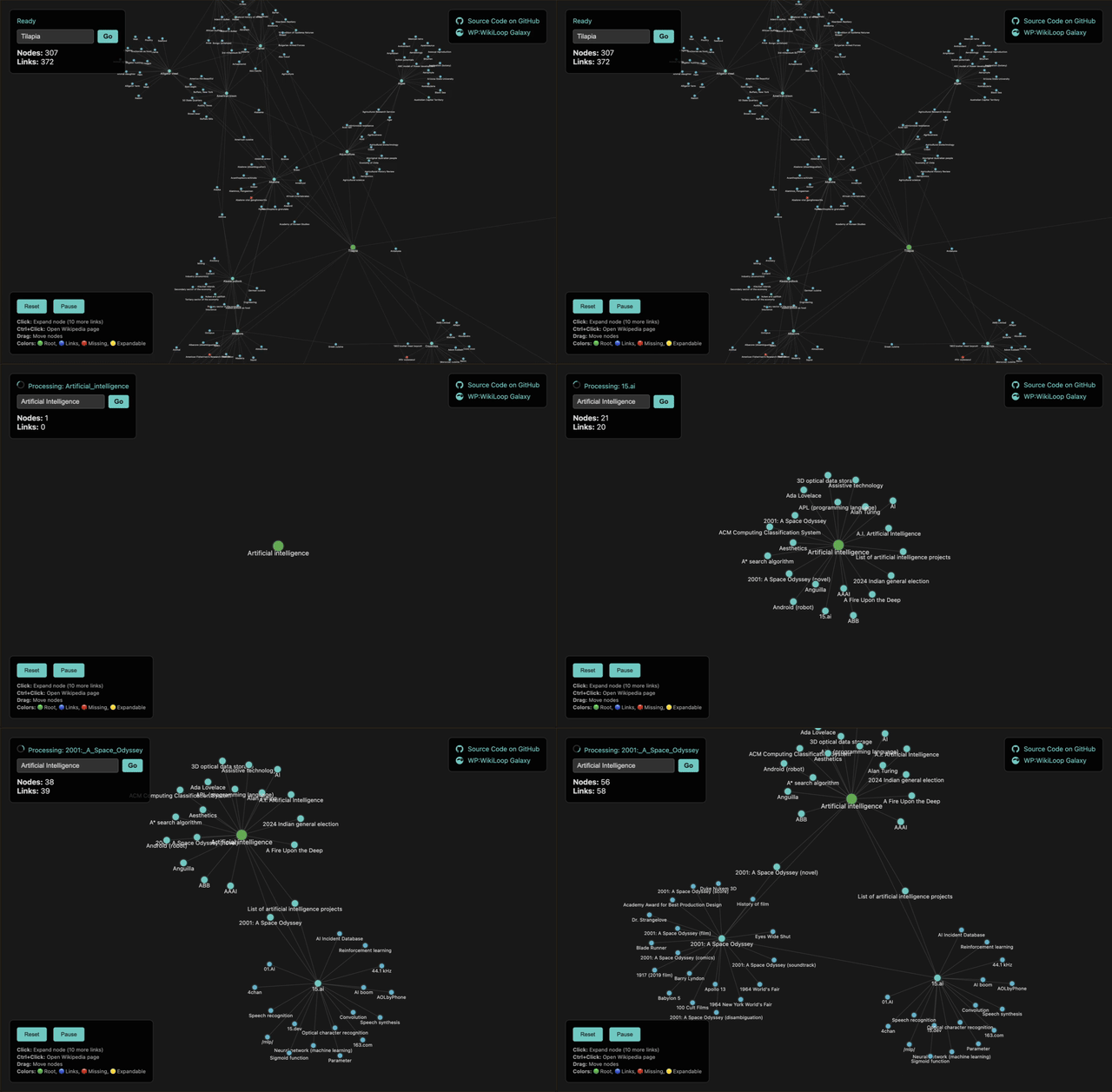


Full WikiLoop Galaxy Demo on Loom
- Bidirectional Link Traversal: Explores both outbound links (FROM articles) and inbound links (TO articles)
- Real-time Graph Building: Starts with a root article and progressively builds the network
- Smart Context Menu: Right-click-style menu with options to expand, collapse, open, or set as root
- Priority-Based Crawling: Prioritizes Vital articles (3000), Featured articles (2000), Good articles (1000), and articles by backlink count
- Link Validation: Checks page existence to handle broken Wikipedia links
- Obsidian-style Dark Theme: Clean, modern interface optimized for graph exploration
- Color-coded Nodes:
- ⚪ White: Root article (starting point) with green border
- 🟡 Gold: Vital articles (highest priority, larger size)
- 🟢 Green: Featured articles (high priority)
- 🔵 Light Blue: Good articles (medium priority)
- 🔵 Blue/Teal: Regular Wikipedia articles (1st/2nd degree)
- 🔴 Red: Missing/non-existent pages (red links)
- 🟡 Yellow Border: Expandable nodes with pulsing animation
- Force-directed Layout: Natural node positioning with physics simulation
- Zoom & Pan: Navigate large graphs with mouse controls
- Click: Show context menu with multiple options
- Context Menu Options:
- 🔗 Open Wikipedia Page: Opens article in new tab
- 🔄 Collapse: Removes leaf nodes (nodes with only one connection)
- ➕ Expand: Reveals 10 more inbound + 10 outbound links
- 🎯 Set as Root: Makes the selected node the new root of the graph
- Drag: Move nodes around the canvas
- Scroll: Zoom in/out of the graph
- Uses Wikipedia REST API for article links and backlinks
- Fetches article categories and metadata for quality assessment
- Implements proper error handling and rate limiting
- Filters out non-article links (categories, templates, files)
- Validates page existence before adding to graph
- Node Deduplication: Prevents duplicate articles in the network
- Link Direction: Maintains proper directional relationships
- Expansion Tracking: Prevents re-expansion of already processed nodes
- Priority Queue: Processes high-quality articles first (Vital > Featured > Good > Backlink count)
- Context Menu: Smart menu system with disabled states for unavailable actions
- Memory Efficient: Limits link counts to prevent browser overload
- Lazy Loading: Only fetches data when needed
- Batch Processing: Processes multiple links efficiently
- Visual Feedback: Shows loading states and progress indicators
- Responsive Design: Adapts to different screen sizes
- Start: Open
index.htmlin a web browser - Explore: The graph begins with "Artificial Intelligence" as the root
- Interact: Click any node to open the context menu with options:
- Open Wikipedia page in new tab
- Expand node with 10 more connected articles
- Collapse node by removing leaf connections
- Set node as new root for the graph
- Navigate: Use mouse to zoom, pan, and drag nodes
- Prioritization: High-quality articles (Vital/Featured/Good) are processed first
- Root Article: "Artificial_intelligence"
- Link Limit: 10 outbound + 10 inbound per expansion
- Traversal Depth: 2 degrees from root (configurable)
- Node Limit: Unlimited (browser memory dependent)
To change the root article, modify line 188 in index.html:
this.startArticle = "Your_Article_Title";The application provides detailed console output:
- 🚀 Initialization status
- 📖 Articles being processed
- 🔍 Links discovered and extracted
- ➕ Nodes being added to graph
- 🔗 Links being created
⚠️ Missing pages and errors- 🖱️ User interactions
- Modern Browsers: Chrome, Firefox, Safari, Edge
- Requirements: ES6+ support, SVG rendering
- Dependencies: D3.js v7 (loaded via CDN)
├── index.html          # Complete single-file application
├── README.md           # This documentation
└── wiki-graph.html     # (Previous version)
- Outbound Links:
https://en.wikipedia.org/w/api.php?action=query&prop=links - Inbound Links:
https://en.wikipedia.org/w/api.php?action=query&list=backlinks - Page Validation:
https://en.wikipedia.org/w/api.php?action=query&titles= - Article Categories:
https://en.wikipedia.org/w/api.php?action=query&prop=categories - Backlink Count:
https://en.wikipedia.org/w/api.php?action=query&list=backlinks&bllimit=max
- Initialize with root article
- Fetch outbound + inbound links
- Validate page existence and fetch metadata
- Assess article quality (Vital/Featured/Good) and backlink count
- Add valid pages as nodes with priority scoring
- Create directional links
- Sort processing queue by priority (highest first)
- Update visual representation with quality-based styling
- Enable context menu interactions for all nodes
Create a Wikipedia user script that hardcore Wikipedians can install directly on Wikipedia pages to instantly visualize article networks without leaving the site.
Features:
- One-click graph generation from any Wikipedia article
- Seamless integration with Wikipedia's interface
- Customizable settings for power users
- Export capabilities for research and analysis
Develop browser extensions for easy installation by non-technical users across all major browsers:
- Chrome Extension: Available on Chrome Web Store
- Firefox Extension: Available on Mozilla Add-ons
- Edge Extension: Available on Microsoft Edge Add-ons
- Safari Extension: Available on Mac App Store
- DuckDuckGo Extension: Privacy-focused browsing integration
Benefits:
- No technical setup required
- Automatic updates
- One-click installation
- Cross-browser compatibility
Implement intelligent caching system to dramatically improve performance and reduce Wikipedia API load.
Caching Strategy:
- Local storage for frequently accessed articles
- Session-based cache for current browsing session
- Intelligent cache invalidation and updates
- Offline capability for previously loaded graphs
Performance Improvements:
- Faster graph loading times
- Reduced API calls to Wikipedia
- Better user experience with instant results
- Bandwidth optimization for mobile users
- Search Functionality: Custom root article selection ✅ (Completed)
- Priority-Based Crawling: Vital/Featured/Good articles first ✅ (Completed)
- Context Menu System: Multi-option node interactions ✅ (Completed)
- Export Options: Save graph as image or data
- Filtering: Hide/show specific link types or quality levels
- Clustering: Group related articles by topic or quality
- Performance: Virtual rendering for large graphs
- Mobile: Touch-optimized interactions
MIT License - Feel free to use and modify for your projects.